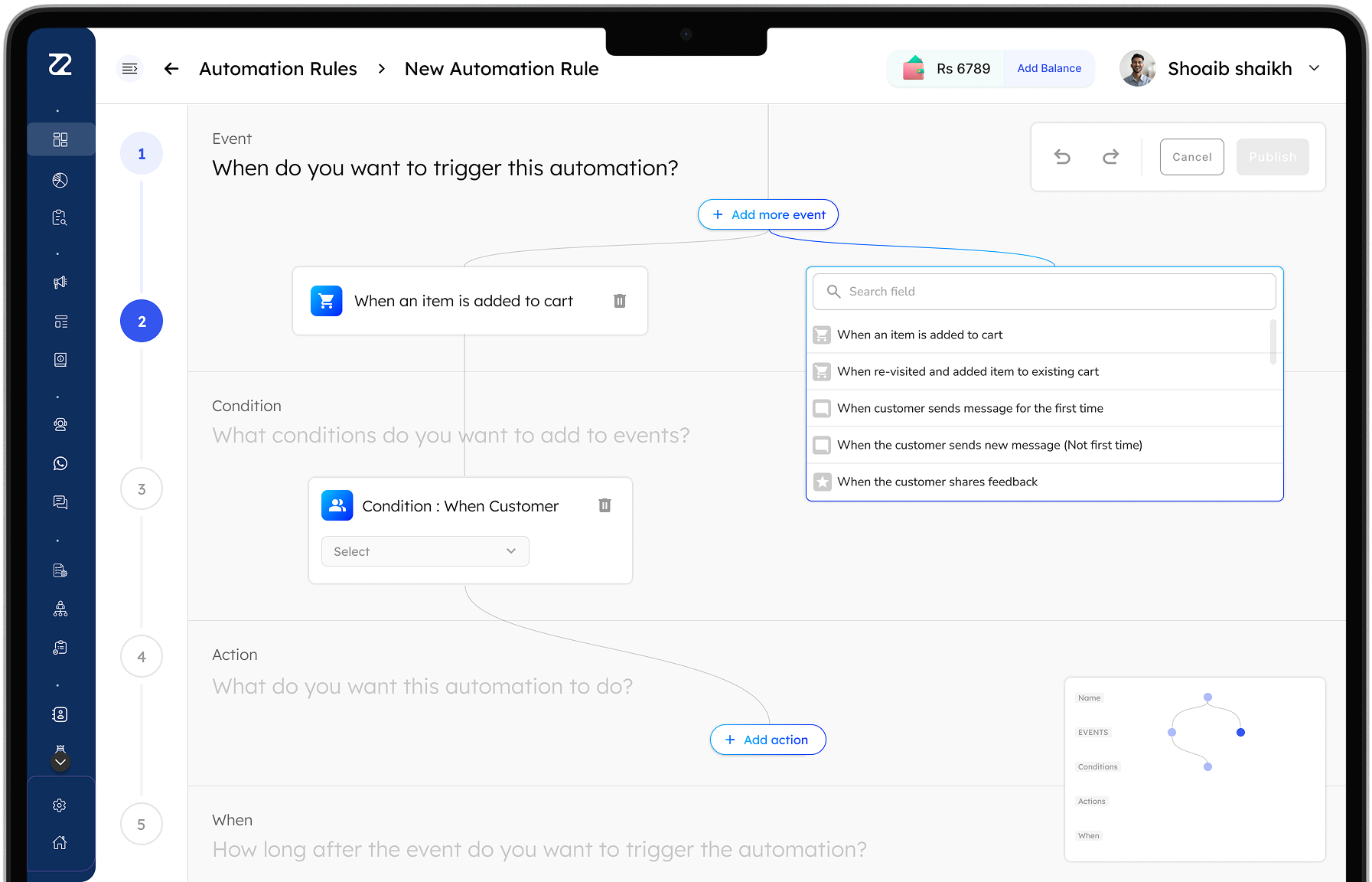
The redesigned automation builder: five guided steps (event, condition, action, when), with events added from a searchable list

Reduced support calls

By making it easy to create a new automation.

Team
Founder & CEO, VP Product, Designer (me), Product Support Team
Client
Zithara.ai

The problem

Users couldn’t create new automations on their own, so they reached out to the support team to be guided through it.

User problems

How we understood the problem
  • Joined the support calls for these cases
  • Evaluated the current design
Problem

Unclear option titles

The options were named in industry-standard marketing terms, designed with marketers in mind, but the users weren’t marketers. Across all 23 use cases, they couldn’t tell what each option meant, what it did, or how to use it to create what they wanted.

For example, what is “Cart is Created” for, and how is it different from “Cart is Updated”?

The event options
Problem

Tabs users couldn’t make sense of

The builder split its triggers across two tabs, “Events” and “Recurrence”, but users couldn’t work out what each tab was for.

The Events and Recurrence tabs
Problem

Conditions cut off from their events

Events and conditions sat in separate lists, so it was hard to tell which condition belonged to which event, and how they worked together.

Which condition belongs to which event

Goals & requirements

The new design had to help users create an automation without needing help or having doubts.

Guide every step

Lead the user through each step of the process.

Make every option clear

Make the context and use of each option simple to understand.

Connect events and conditions

Show how events and conditions relate, in a way that feels familiar from similar tools in the industry.

Design iteration 1 & user testing

Zithara’s automation system works in 5 fixed steps, unlike open-ended flow builders.

So we designed a 5-step builder that groups the options into task categories, so users can understand it at a glance.

Automation builder: design iteration 1
Results

Tested with 4 users (from clients)

100%Completed the task
50%Got stuck adding a condition
Other observations
  • Renaming “Add event” to “Add more events” after the first may show that more can be added (same for actions)
  • Users paused briefly before finding the question that tells them what to do

Design iteration 2 & user testing

Results

Tested with 3 users (from clients)

100%Completed the task
0%Got stuck or confused

Impact

Users can now create a new automation on their own, without help, which cut down the calls to the support team.

Interact with the prototype